HMI User Manual
1. Introduction
This manual covers the Human Machine Interface (HMI) that drives the companion PLC over ESP-NOW. It explains power-up, captive portal configuration, day-to-day operation, and the command protocol so you can mirror the process in Confluence or train operators on the current firmware.
2. System Overview
- Hardware: Microcontroler with 7" RGB touch display, capacitive touch, BOOT button (GPIO0) for maintenance, and a bottom-left status LED tied to ESP-NOW send results.
- Firmware: PlatformIO environment
hmi. ESP-NOW transport is strictly unicast; the PLC MAC must be configured in NVS before any traffic is sent. - Companion PLC: Industrial Shields Microcontroler PLC (environment
plc) that receives commands, closes the control loop, and returns acknowledgements. Replies go directly back to the HMI that issued the command. - Advanced gating: Access to the Config and IO pages is enabled only when the PLC asserts the "Advanced" input (bit 7 / I8 high) in its status stream.
3. Navigation & Page Access
- The UI is portrait-oriented: Main → Jog → Config → IO → Main. Navigation arrows in each header advance or back up one page.
- The on-screen numeric keypad stays visible across pages and always targets the currently focused text area.
- Config and IO remain hidden until the PLC reports the Advanced/Service input (I8). When the bit drops low the firmware automatically returns to the Main page.
4. Main Page
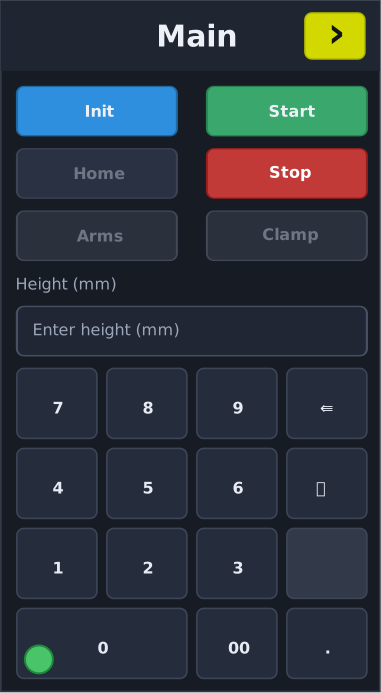
- Init: primes the PLC state machine (
CMD_INIT). Required after boot or fault reset; other motion is blocked while init-ready is false. - Start: reads the height text box, converts millimetres to encoder counts using the calibrated ratio/height/gap values, pushes
CMD_SET_TARGET, and finally issuesCMD_START_MOVE. The button remains disabled until Init completes, the PLC confirms it is homed, and the clamp output (O4) is released. UI states: grey while idle, blue while the PLC reports motion in progress, green whenactivityFlagsmark the axis at target (latched until the next jog or move), and red when the clamp is engaged or a start error is latched (target beyond travel, missing calibration data, or a conversion failure). - Home: requests a homing sequence (
CMD_HOME). - Stop: sends
CMD_STOPfor an immediate halt; the drive may still coast briefly while it ramps down. - Arms / Clamp pulses: momentary buttons that ask the PLC to pulse its virtual inputs (
CMD_PULSE_I5andCMD_PULSE_I6). Each pulse is accepted only when Init is complete, the PLC is homed, and the status confirms the required interlocks (clamp locked for Arms, arms engaged sensor for Clamp). In the ready state the Clamp button renders grey, turns green when the clamp is locked, shows red if the output is active but the lock bit is missing, and stays disabled (greyed out) whenever interlocks block the action. - Height entry: the text field accepts millimetres. Editing schedules a
CMD_SET_TARGET; clearing the field leaves the previous target active until you enter a new value. If conversion parameters are missing or invalid, the UI raises a “Start error” and disables motion for two seconds. - Numeric keypad: layout
7 8 9 / 4 5 6 / 1 2 3 / 0 00 .with a trash can key for clearing the field. The keypad is always bound to the focused textbox. - Status LED: the bottom-left indicator is green when the last ESP-NOW send callback reported
ESP_NOW_SEND_SUCCESS, red otherwise.
Main Page Buttons
| Control | Command(s) | Behavior | Notes |
|---|---|---|---|
| Init | CMD_INIT |
Requests the PLC to enter motion-ready state and reset interlocks. | Other motion buttons stay disabled until Init completes; PLC may ignore if already running an init or fault state persists. |
| Start | CMD_SET_TARGET, CMD_START_MOVE |
Converts the height field (mm) to counts, stores the target, and triggers motion. | Disabled until Init-ready, homed, and clamp-released; also blocked while Clamp (O4) is active, when conversion parameters are missing, or if PLC reports a fault. A “Start error” message is logged if the target is rejected. |
| Home | CMD_HOME |
Begins the homing routine. | PLC ignores the request if homing is already active; button turns blue during motion and green once homed. |
| Stop | CMD_STOP |
Issues an immediate stop command. | Always allowed; PLC may still coast to a halt depending on its drive logic. |
| Arms pulse | CMD_PULSE_I5 via button press |
Sends a 100 ms virtual input pulse to engage the arm circuit. | PLC only accepts when Init is complete, the axis is homed, and the clamp lock status bit is set; otherwise it ignores the pulse and the UI briefly flashes the button. |
| Clamp pulse | CMD_PULSE_I6 via button press |
Sends a 100 ms virtual input pulse to toggle the clamp. | Requires Init-ready, homed status, and the Arms sensor (I0) high; PLC drops the request if interlocks are not met. |
5. Jog Page
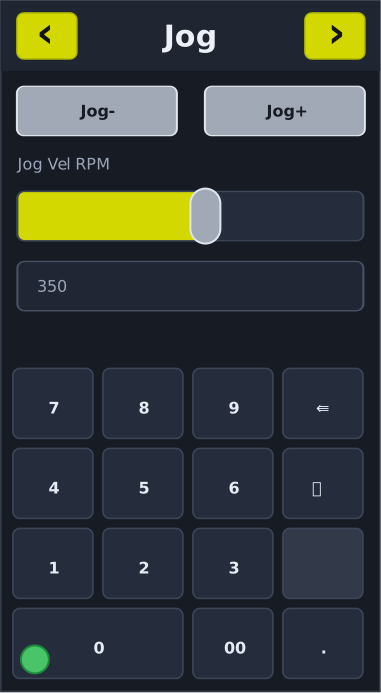
- Jog− / Jog+: streaming buttons that piggy-back on the continuous
CMD_UI_STATEmask. Pressing a jog button also re-sends the current slider RPM to keep the PLC’s ramp target in sync. - Jog velocity slider: linear 10–1800 RPM (left-to-right). Value changes update the nearby label; releasing the knob triggers
CMD_SET_JOG_VELwith the selected RPM and pressing a jog button also re-sends that target. Jog controls disable automatically while Init is pending, the clamp is locked, or the PLC reports homing in progress.
Jog Controls
| Control | Command(s) | Behavior | Notes |
|---|---|---|---|
| JOG− / JOG+ | CMD_UI_STATE bits |
Press/hold flags the jog direction in the streamed UI mask. | Disabled while Init pending, clamp locked, or homing; PLC stops jogging when bits clear. |
| Jog velocity slider | CMD_SET_JOG_VEL |
Updates the desired jog RPM on release; pressing a jog button also re-sends the current value. | Range 10–1800 RPM; PLC may clamp the value if outside its limits. |
6. Config Page (Maintenance Mode Required)
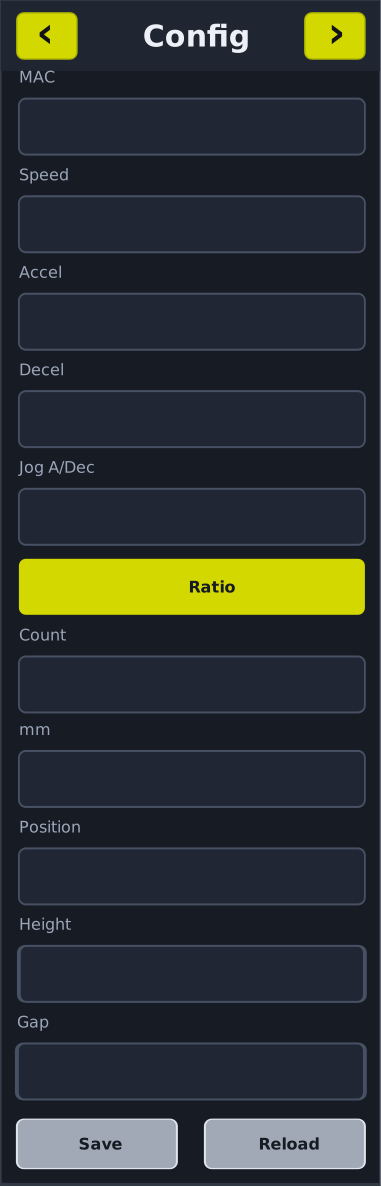
- Device MAC: displays the HMI STA MAC for maintenance reference.
- Motion parameters: editable fields for Speed, Accel, Decel, and Jog A/Dec (all uint16 encoded in the save payload).
- Ratio section: captures encoder counts (
ratioTicks) and travelled distance (ratioMm) to establish the counts-per-mm conversion used by the height field. - Position: read-only display updated from ACK payloads (counts converted to millimetres when data is present).
- Height & Gap: persisted as thousandths of a millimetre (
heightMm1000,gapMm1000). Gap feeds the over-travel protection when translating millimetres to counts. - Save: sends the extended
CMD_SAVE_CONFIG, which now includes motion parameters, reserved param5/6, ratio ticks/mm, height, and gap. The PLC replies withACK_CONFIGechoing the stored values (and optional position counts). - Reload: issues
CMD_RELOAD_CONFIG. Fields update as soon as the PLC answers withACK_CONFIG.
Config Buttons
| Control | Command(s) | Behavior | Notes |
|---|---|---|---|
| Save | CMD_SAVE_CONFIG |
Sends motion parameters, ratio ticks/mm, height, and gap to NVS on the PLC. | PLC replies with ACK_CONFIG; values must be valid uint16/uint32 ranges or the PLC may reject and log an error. |
| Reload | CMD_RELOAD_CONFIG |
Requests the PLC to resend stored parameters. | Fields refresh when ACK_CONFIG arrives; if PLC cannot read NVS the reply may contain defaults. |
7. IO Page (Maintenance Mode Required)
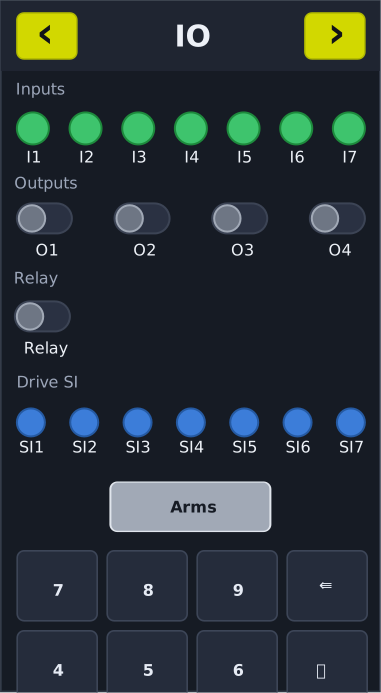
- Inputs I1–I7: indicator LEDs illuminate green when the PLC reports the corresponding digital input high.
- Outputs O1–O4: LVGL switches track PLC outputs and request
CMD_SET_OUTPUTSwhen toggled. The PLC can force-disable these switches (they grey out) while homing or when Init isn’t complete. - Relay: dedicated switch mapped to
CMD_SET_RELAY. - Drive SI1–SI7: blue LEDs that expose PLC drive inputs. Tap Refresh to send
CMD_STATUS_POLL; the nextACK_STATUSupdates the SI bank (driveInputsMask).
IO Controls
| Control | Command(s) | Behavior | Notes |
|---|---|---|---|
| O1–O4 toggles | CMD_SET_OUTPUTS |
Mirrors the PLC output mask when toggled. | PLC can disable interaction (grey state) during homing or when Init isn’t ready; conflicting writes from PLC override the switch. |
| Relay toggle | CMD_SET_RELAY |
Switches the relay output. | PLC may force the relay state if safety logic is active. |
| Refresh (Drive SI) | CMD_STATUS_POLL |
Requests an immediate status update to refresh SI indicators. | SI LEDs update on the next ACK_STATUS; repeated polls while link down produce send failures (!). |
8. Status Indicators & Feedback
- Serial console (115200 bps)
.prints on every successful send callback;!on failure.ESP-NOW: ACK_STATUSlogs appear at most once per second;ESP-NOW: ACK_CONFIGlogs land when configuration data is received.- “Start error” messages identify conversion or interlock failures that prevented a motion command.
10. Maintenance & Recovery
- Changing the PLC peer: reboot while holding BOOT to wipe preferences, then re-enter the MAC via the captive portal.
- Firmware updates:
pio run -e hmi -t uploadflashes the panel; usepio run -e hmifor a build-only cycle. - Serial monitoring:
pio device monitor -p <port> -b 115200provides real-time logs for troubleshooting.
11. Troubleshooting
| Symptom | Checks & Corrective Actions |
|---|---|
| Config/IO pages stay hidden | Ensure the PLC drives I8 (Advanced) high. Until that bit is set, navigation clamps to Main/Jog. |
| Start button turns red and motion doesn’t begin | Confirm Init completed, Clamp (O4) is off, and the height field contains a valid value within the calibrated range. Review serial “Start error” details. |
| Arms/Clamp pulse buttons greyed out | PLC interlocks aren’t satisfied (e.g., clamp not locked for Arms). Verify inputs in the IO page and PLC logs. |
| Jog slider has no effect | Check that Init is complete and clamp isn’t locked. The RPM re-sends when you release the slider knob or press a jog button. |
| SI indicators never change | Tap Refresh to issue CMD_STATUS_POLL and watch for the next ACK_STATUS. |
Status LED stays red / repeated ! in logs |
Re-run the captive portal to verify the peer MAC, confirm PLC power/range, and inspect serial send errors. |
12. Reference Commands
| Command | Direction | Payload | Notes |
|---|---|---|---|
CMD_UI_STATE (0x01) |
HMI → PLC | Button bitmask (Start, Stop, Home, Jog±, Init, etc.) | Streamed continuously with pacing. |
CMD_STATUS_POLL (0x02) |
HMI → PLC | — | Prompts an immediate ACK_STATUS (used by Refresh button and watchdog). |
CMD_INIT (0x17) |
HMI → PLC | — | Arms the PLC control state; required before motion. |
CMD_SET_TARGET (0x18) |
HMI → PLC | Absolute counts (int32 LE) | Generated from the height field before starting motion. |
CMD_START_MOVE (0x19) |
HMI → PLC | — | Executes the previously stored target. |
CMD_STOP (0x11) |
HMI → PLC | — | Immediate stop. |
CMD_HOME (0x13) |
HMI → PLC | — | Starts the homing routine. |
CMD_SET_JOG_VEL (0x22) |
HMI → PLC | RPM (uint16 LE) | Sent when the jog slider is released or when a jog button is pressed. |
CMD_PULSE_I5 (0x23) |
HMI → PLC | — | Requests a 100 ms pulse of virtual input I5 (Arms). |
CMD_PULSE_I6 (0x24) |
HMI → PLC | — | Requests a 100 ms pulse of virtual input I6 (Clamp). |
CMD_SET_OUTPUTS (0x20) |
HMI → PLC | Output mask (bit0=O1 … bit3=O4) | Issued by IO page toggles when enabled. |
CMD_SET_RELAY (0x21) |
HMI → PLC | 0/1 | Relay control switch. |
CMD_SAVE_CONFIG (0x30) |
HMI → PLC | Speed, Accel, Decel, JogRamp, Param5, Param6 (uint16); RatioTicks, RatioMm1000, HeightMm1000, GapMm1000 (uint32) | PLC stores values and returns ACK_CONFIG. |
CMD_RELOAD_CONFIG (0x31) |
HMI → PLC | — | PLC replies with ACK_CONFIG. |
ACK_STATUS (0x80) |
PLC → HMI | Inputs, outputs, relay, activity flags, optional drive input mask, optional position counts | Drives UI colours, button enable state, SI LEDs, and position readouts. |
ACK_CONFIG (0x81) |
PLC → HMI | Speed, Accel, Decel, JogRamp, inputs, outputs, relay, optional ratio/height/gap, optional position | Populates Config fields and cached conversion parameters. |
For contributor-facing implementation notes, see HMI/README.md and AGENTS.md.